
GlassMD
GlassMD is a small macOS app that shows a .md file as a readable page and lets you edit it in the same window. It leans on the platform for saving, refuses to become a note library, and is deliberately careful in a few places where markdown tools usually are not.
Not on the App Store yet. What that is waiting on is at the foot of this page.
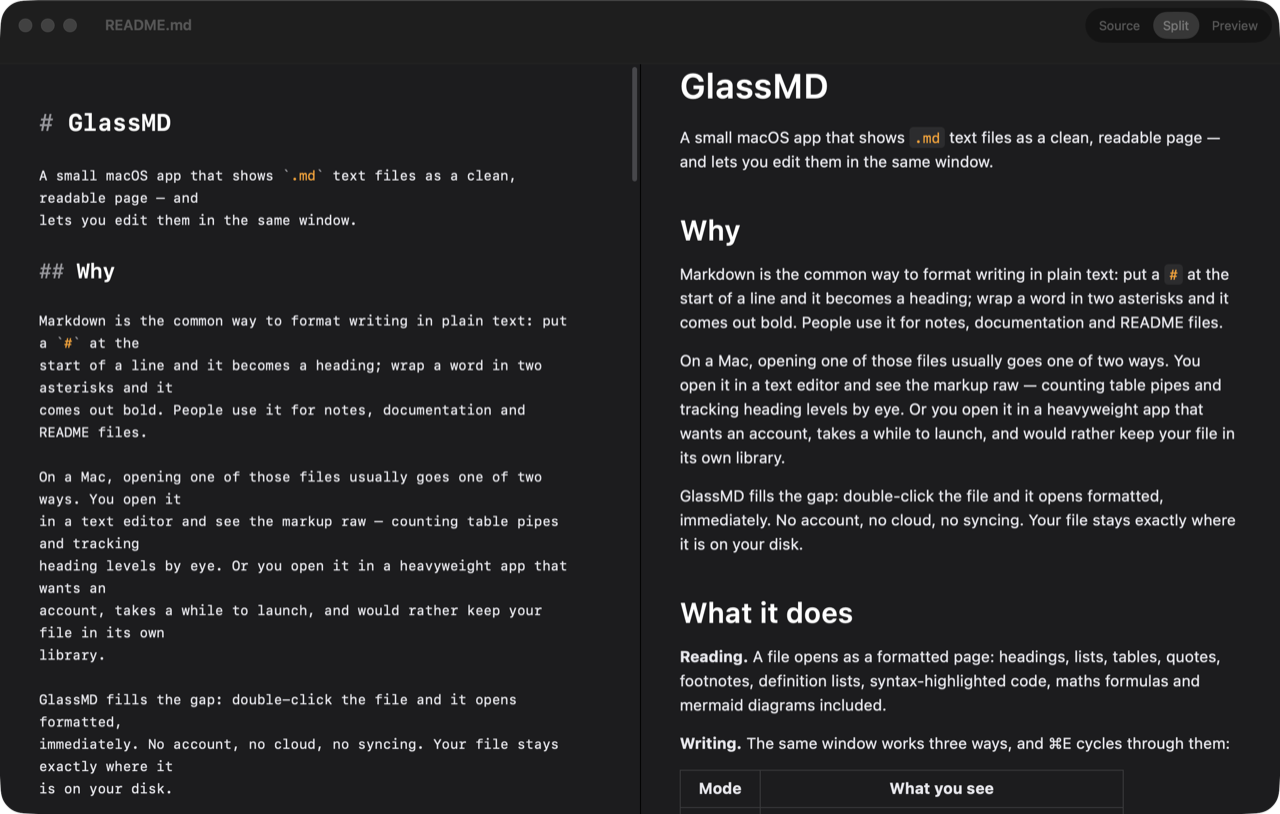
What it is arguing against
Opening a markdown file on a Mac tends to go one of two ways. A text editor shows you the markup raw, so you count table pipes and track heading levels by eye. A heavyweight notes app opens the file properly and then wants an account, a moment to launch, and ideally to keep the file in a library of its own.
The gap between those is the whole product: double-click the file, see it formatted, and find it still sitting where you left it on disk. Nothing to sign in to, nothing that syncs. Everything below is a consequence of taking that seriously rather than a feature list.
The file is the file
The strongest commitment in the app is also the least visible: open a file and save it, and its text encoding and its line endings come out exactly as they went in. No feature depends on this. What depends on it is nobody ever opening a pull request where every line changed because a tool they used decided the file should have been UTF-8 with LF all along.
It has a second half. When the file changes underneath you in another program, the app does not pick for you twice over: if you are not editing, it quietly shows the new version, because there is nothing of yours to lose. If you have unsaved changes, a bar appears at the top and the choice stays yours. The easy version of this feature is a modal that interrupts you every time; the easy version is also the one that trains you to dismiss it.
Saving itself is mostly not a thing you do. The app uses macOS’s own autosave and Versions, so ⌘S still works and is rarely needed, and File → Revert To walks the file back through earlier states. Using the platform’s machinery here rather than writing a save system is the reason Revert To exists at all — it would not have been built by hand.
Raw HTML is a decision you make per file
Markdown can carry embedded HTML, and HTML in a file someone sent you is not always innocent. So it is off: such content renders as plain text, and you see what it says rather than what it does.
The part worth defending is what happens when you want it anyway. Allowing HTML is a per-file decision, in the View menu, for the file in front of you. It is deliberately not a preference — a single switch in settings gets flipped once, for one file you trusted, and then silently covers every file you open afterwards, including the ones you did not write. A permission that outlives the reason you granted it is not a permission any more.
Degrading instead of freezing
Large files are where a renderer usually stops being honest: it accepts the file, gets slower, and leaves you to work out why typing feels wrong. This one gives up in stages instead, and says so. Past one size it drops syntax highlighting while you type. Past a larger one it opens the file read-only. Either way there is a message; the failure mode is a smaller app, not a beachball.
The same rule covers files it cannot open at all. A read-only file, or one in an encoding it does not recognise, produces a bar explaining the situation. A blank window with no explanation is the outcome being avoided, and it is a more common outcome than it should be.
The subtraction
What the app refuses is most of what a markdown app usually grows into, and the list is short and specific.
- Not a note library. No folder tree, no tags, no search index — Finder already does that, and a second hierarchy over the same files is a thing to keep in sync.
- No cloud and no syncing. There is no account to make and the app does not connect anywhere.
- No collaboration. Two people cannot edit one document together.
- No help with the writing. No autocomplete, no formatting buttons, no suggestions; the markdown is yours to type.
- macOS only, with no Windows or Linux version behind it.
Reading is the part that gets the effort instead: headings, lists, tables, quotes, footnotes, definition lists, syntax-highlighted code, maths formulas and diagrams all come out looking the way they should. Editing shares the window and one shortcut — ⌘E cycles source, split and preview — and in split view the two sides scroll in step rather than drifting apart.
Appearance is yours to set, and the reason it is worth a mention is that every change appears instantly in every open window: no save button in the settings panel, no reopening the file to see what you did. Type, colours, spacing and page width, set independently for light and dark, starting from System, Sepia, GitHub or High Contrast. Changing anything in a preset gives you your own copy and leaves the preset intact, which is the difference between a starting point and a thing you can ruin.
The defect that is not code
Select a .md file in Finder, press space, and you get a formatted preview without opening the app — the fastest way to see inside a file. It currently renders with the default theme rather than the one you configured, and it will keep doing that until the app is distributed properly, because the preview runs as a separate extension that has to be signed alongside the app to be trusted with your settings.
It is listed here rather than left out because it is the one part of the app a user would notice and reasonably call broken. The cause is the signing it is waiting on, not anything about how the preview is drawn.
Where to get it
Nowhere yet, and that is the honest answer. The app runs and gets used daily, but handing a Mac app to someone else needs records on Apple’s side that do not exist — a paperwork problem rather than a code one. It is put this way rather than dressed up as a launch that is coming, because a date nobody can hold to is worse than no date.
What it does with your data is a page of its own: the privacy policy. The summary is that it collects nothing.